Controls & Exploration
Navigating the World
Luminara is a vast world filled with mysteries, dangerous creatures, and hidden knowledge. Use these basic controls to navigate your surroundings:
- W, A, S, D or Arrow Keys: Move your character up, left, down, and right.
- Mouse Click: Walk to a spot, or tap an NPC to talk to them. In a battle, tap the action buttons — ⚔️ Attack, ✦ Skills, 🛡️ Defend, 🧪 Item, 🏃 Run, and 💥 Limit Break once it is unlocked.
- On Mobile: A virtual joystick will appear on the bottom left for movement. Tap to interact.
When you encounter a creature corrupted by The Forgetting, walking into them starts a battle straight away — no question attached. Your child fights with the gear, skills and Limit Break they have earned, and nothing ever stops the fight to ask them something. Knowledge is what made them strong before the fight: Lumen from answering curriculum questions is what bought the gear and lit the skill tree.
The Dual-Currency System
Lumen vs. Gems
As you adventure and learn, you will accumulate two distinct types of currency, each with a unique purpose.
- Lumen (White Light): Earned by correctly answering educational questions — in the 📚 Quiz, in the Party Quiz you play with a friend, and in the Reading Nook, where every correct comprehension answer pays 4× the usual amount (stories take longer, so careful reading is the richest way to earn). A few smaller streams also pay Lumen: finishing quests, a friendly 1-v-1 duel (4 Lumen per question you get right, up to three paid duels a day), the first time your child masters a Model Forge build, and selling gear back to a shopkeeper. Battles never pay Lumen — not ordinary fights, not bosses, not the weekend raid. Lumen is spent on gear, skill-tree nodes, inn rests, and class swaps.
- Gems (Sparkling): Dropped by defeated monsters or given as quest rewards. Gems buy cosmetics — Auras, Pets and Outfits — in the town shop. (One non-cosmetic exception: the shopkeepers in Lux Haven and Verbia sell a 🍜 bowl of ramen for 88 💎, which is a step in the Panda's side quest.)
Note: You cannot buy power. Lumen must be earned through learning!
Equipment Fusion
Forging Greater Power
To defeat tougher enemies in later zones, you'll need stronger gear. You can combine identical pieces of equipment to forge a higher-tier version.
- The Forge: Visit the blacksmith in town or use a portable anvil.
- The Process: Combine two identical items (e.g., two Tier 1 Swords) along with a required amount of Lumen to create one stronger item (e.g., one Tier 2 Sword).
- Visual Upgrades: Upgraded weapons not only deal more damage but also look more epic in your inventory and on your character!
Playing with Friends
Learning sticks when it's shared. When Light Fades has four ways to play with real friends — learn side by side in a 1-v-1 mini-game, team up for the weekend challenge against the Sentinel, brave the endless Hall of Trials as a party, or simply explore the world together — and all of them are built to be completely safe.
- Friends-only & parent-approved. You add a friend by their username, and the request only becomes a friendship once the receiving child's parent approves it. Both children need a verified parent email before they can send or receive requests at all, so no stranger can add your child.
- No open chat, ever. There's no free-text messaging anywhere in the game. The only thing you see of a friend is a read-only hero card — a few pages of their character, class, level, pet and badges.
- Character names only. Other players only ever see your hero's character name — chosen at creation and checked for safety — never your login username, on any leaderboard, lobby, or nameplate.
- No pay-to-win, no power trading. Nothing between players can be traded, gifted or bought — and no amount of real money buys a single point of combat power. Playing together can earn real progress, but only by doing the work: the Party Quiz pays Lumen for each question your child answers correctly, exactly as a solo quiz does; a duel pays 4 Lumen per question they get right; and a real weekend Team Challenge win pays XP, Gems and gear. Never Lumen for winning a fight, and never anything a friend can hand over.
1-v-1 Mini-Game Duels
Learn together, head-to-head
Challenge a friend to a real-time duel on a shared mini-game — a Word Search hunt or an Equation Pyramid race. Both of you get the exact same board at the same moment and race to score the most across several rounds — sharpening the same skills side by side.
Highest total score wins the round. You'll both need to be online at the same time.
Every question you get right pays 4 Lumen, whether you win or lose — for up to three duels a day. Winning itself grants no extra Lumen, no gear and no power, so there is nothing to gain by beating a friend beyond pride and pet experience.
Weekend Team Challenge
Up to 4 friends vs. the Radiant Sentinel
Rally a party of up to four in total — you and up to three friends — against a single mighty boss, the Radiant Sentinel. Speak to Captain Helm in Lux Haven to start a team (or choose Practice first).
It is a straight team fight. The Sentinel's blows land on everyone at once, so a party spreads the damage that would flatten one child alone — and a teammate who goes down can be revived by anyone still standing. Skills are how a team turns the fight: weaken, lower its defence and stack vulnerability, and the Sentinel hits softer for the whole party. Teamwork is the weapon here.
Practice mode lets you rehearse risk-free — no one can fall (health never drops below 1) and items are unlimited — but it grants no rewards. A real win earns XP, Gems, and loot up to Rare quality.
The Sentinel only stirs on the weekend (Fri–Sun, Singapore time). As with every battle in the game, it mints no Lumen — the raid pays XP, Gems and gear, never the currency that buys power.
The Hall of Trials (Boss Trial)
How far can your light reach?
Through the Herald of Trials in Lux Haven lies an endless gauntlet: bosses come one after another, each stronger than the last, with no healing between fights. Fall once and the Trial ends — the next attempt starts again from Boss 1. Speak to The Custodian to begin, alone or with up to three friends (a bigger party faces tougher bosses).
Nothing interrupts a Trial fight — a child is never stopped mid-boss and asked a question. It is won on preparation and play: the gear and skill-tree nodes bought with Lumen beforehand, and how well the fight itself is handled. Deeper bosses cast area blasts, binding spells, and carry passives like enrage.
Each boss felled pays Gems; pushing past your personal best banks XP that is paid out when the run ends, and conquering Boss 5 and Boss 10 awards exclusive auras you can't buy anywhere. In team runs the party's health carries from boss to boss — protect each other, because nothing heals between fights. Your deepest run ranks on the 🏆 Trial boards in the Hall of Heroes — solo and team (team rows list every member's character name).
The Custodian also offers the ⚡ Trial in Motion — the same gauntlet, fought in real time. Move freely around the arena, strike on your own rhythm, and step out of the amber glow before a boss spell lands. Choose your challenge before you enter — 😌 Easy, ⚖️ Moderate, 🔥 Hard, or 💀 Nightmare; the harder tiers add cunning boss tactics, Echo Shade underlings, and a livelier pet, and pay more Gems (never Lumen). Then a 🛡️ Prepare for the Trial screen lets you set your pet's stance, load a 3-slot potion belt, and dial each skill's power tier (I/II/III) before you commence. Your first visit begins with a harmless Training Shade that teaches the controls (skippable), and the pause screen carries comfort settings — Less Motion, Left-Handed Controls, and Battery Saver. Each difficulty ranks on its own ⚡ Trial RT sub-board.
The Trial is always open with unlimited attempts — but repeat runs of bosses you've already beaten pay no XP, and no part of the Trial mints Lumen. The Trial in Motion follows the same law: only new ground rewards you.
Your Class Move (the E button)
One signature trick, and every class has a different one
In the ⚡ Trial in Motion every class carries one special move of its own — press E on a keyboard, or tap the glowing disc beside your skills. It costs no mana, ever: it is the button you reach for when things go wrong. Each has its own cooldown, and if you press it too early or out of range the game simply says so and does not spend the cooldown.
🛡️ Knight — Shield Charge. Point the stick away from the boss and you hop backwards out of trouble. Point it anywhere else and you charge in, striking as you arrive and shrugging off most damage for a moment afterwards. Two moves in one button, chosen by which way you are leaning.
🤸 Ranger — Tumble. A quick roll. For a heartbeat in the middle of it you cannot be hurt at all — so a perfectly timed tumble passes straight through an attack. Let go of the stick and you roll away from the boss automatically.
✨ Mage — Blink. Vanish and reappear a short distance away, instantly. You leave a Mirror Shade behind you — a fading double the boss keeps aiming at for a moment or two. Spells already winding up will land on the shade instead of on you. It fades quickly, so it steals the attack that was already coming; it will not hide you from the next one.
📖 Scholar — Bookmark Snare. Pins the boss where it stands: it moves and attacks more slowly, and for a few seconds it is silenced — it cannot use its special skills at all. The boss glows with a broken violet ring while it is cut off, so you can see exactly how long you have. Needs the boss reasonably close.
🌸 Healer — Bloom. Heals you at once and keeps healing for several seconds afterwards. Alone among the six it can be cast while running — you never have to stand still to save yourself.
💫 Enchantress — Dazzle. Scatters the boss's focus: its next warning glow winds up noticeably slower, and it crawls for a moment. The extra warning time is pure thinking room.
The class move never costs Lumen and never earns it — like everything in the Trial, it is about skill, not currency. Mirror Shade is a solo-run trick for now; in team runs the mage still blinks, but no shade is left behind.
Play Together — Shared World
Explore Luminara side by side
Open Menu → 🌍 Play Together to host a shared world and invite up to three friends. You'll see each other walking the same towns and wilds — outfits, auras and pets included — with the host leading the way through portals.
Walk into a wild creature together and you fight it together in a shared battle. And while friends are with you, the Quiz Master offers a Party Quiz — a synchronised speed round where everyone answers the same questions at the same moment. Correct answers earn each player their own Lumen, exactly like a solo quiz.
Same safety rules as everything social: confirmed, parent-approved friends only — and still no chat.
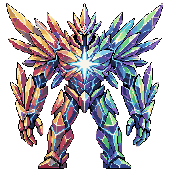
The Radiant Sentinel — rally your team and face it together each weekend.
Mini-Games & Your Pet
Every town has a friendly character who runs a quick educational mini-game. They're bite-sized, relaxed, and the main way your companion pet grows — each school subject feeds one of the pet's four stats.
- No countdown. Play at your own pace — nothing ticks down while you think.
- Tap to play. Tap a letter, tile, gear, or bin to place it — no fiddly dragging, and it works beautifully on a phone.
- Stuck? Use a Hint. Most games carry a 💡 Hint that reveals a clue and trims the pet-xp reward a little — there when you need it, without being a free pass. (Word Search is the exception: it has no hint button, but every word comes with its meaning shown from the start.)
- Leave anytime. Tap the × in the corner to step out whenever you like — everything you got right still counts.
- Matched to your child. Words and puzzles scale to your school level and current difficulty tier (see Adaptive Progression).
- Almost no Lumen — by design. Mini-games grow your pet, not your combat currency, so there is no way to grind your way to power. The one exception is the Model Forge: the first time your child masters a particular kind of bar model at their level, it pays 20 Lumen once — and nothing at all if they used a hint. Replay it as often as you like; after that first mastery it pays pet experience like every other game.
The current line-up
Seek out these hosts as you explore. Each game trains a subject and pumps the matching pet stat:
English
Verbia, Town of Words · with Riddler Quill 🎲
Spelling Scramble & Word Search — spell and hunt for words pitched at your level. And beneath the Library of Imagination waits 🕳️ The Cloze Cavern — restore the words The Forgetting has eaten out of books you've finished reading (see the Reading chapter).
Trains English → pet ATK ⚔️
Chinese 华文
Cíyǔ, the Ink Gardens · with 平安
词语 Word Builder — assemble valid 词语 and place them correctly in a sentence.
Trains Chinese → pet DEF 🛡️ (also feeds HP for P1–P2)
Math
Numerion, the Clockwork City · with Digit
Digit keeps five puzzles and asks “Which puzzle today?” — ⚙️ Gear Ratio Puzzle (ratios), 🔵 Equation Pyramid (PEMDAS number-stacking), 📊 Model Reader (read the answer off a bar model), 🏗️ Model Forge (build the bar model yourself — the one game that can pay Lumen, see above), and 🍰 Fraction Lab (compare fractions in the school's own notation, with a worked explanation when you miss).
Trains Math → pet SPD ⚡
Science
Eureka, the Living Lab · with Nova
Classify It! — sort specimens into the right groups (living/non-living, states of matter, and more).
Trains Science → pet HP ❤️ (P3–P6; pure practice for younger years)
Your pet's overall level is its weakest stat — not its best. A child who only plays English games will see ATK soar while the pet itself stays small, until the other subjects catch up. It's a gentle nudge toward balanced practice, and a signal any parent can read at a glance. Full detail in the Pet Evolution entry below.
The Reading Nook & the Library of Imagination
In the heart of Verbia stands a castle built entirely of books — the Library of Imagination. Walk through its front gate and you'll find Sage Inkwell waiting among floating candles and drifting, enchanted books. This is where reading becomes an adventure of its own.
- Choose a book. Inkwell's shelf has three tabs: 📚 New holds stories and true-facts reads picked for your level (tap Surprise me! and let him choose); 📖 Read again keeps your 24 most recently finished books — revisit any story just for joy, no questions asked (and no rewards either — those were earned the first time). Finishing a 25th nudges the oldest off the shelf, so star a favourite to keep it forever; ⭐ Favorites is never trimmed. And and ⭐ Favorites holds any book you've marked with its ☆ star, so a treasured tale is never more than two taps away. Keep an eye out for rows that glow purple with a 💫 Sparked by… credit — those are stories dreamed up by fellow readers at the Story Forge and published for everyone.
- Watch the teaser first. Some books carry a 🎬 teaser — a short animated cartoon of the story's opening, narrated by the same storyteller voice, that stops right at the mystery. Watch it to the end and the book opens by itself… because now you have to know what happens.
- Read at your own pace — or listen along. Every book opens with its own storybook illustration, and stories are shown page by page with no timer. Almost every book also has a 🔊 read-aloud button: a warm storyteller voice narrates the whole story while you follow the pages — perfect for younger readers still finding their feet. (Living Books 🧭 are the exception for now — a story that branches needs a narrator who can follow your choices, and Inkwell says that magic is still brewing.) A gentle pause before the questions appear rewards actually reading — skimming won't help, because every question needs the story to answer.
- Answer 2–4 questions — earn 4× Lumen. Each correct comprehension answer pays four times what a regular quiz question pays. Reading takes time, and the reward respects that — it's the richest Lumen per answer in the game.
- Finish with the Word Round. After the questions, two spelling scrambles built from the story's own words feed your pet (+8 ATK xp each) — so every story grows both your Lumen and your companion.
- Look for the teal 🧭 Living Books. Some shelf books glow teal with a compass and a "you choose" tag — these stories stop at a crossroads and ask you to decide what the hero does next. Read carefully: the story itself holds the clue to which path suits your hero, and each choice leads to a different ending. Both paths pay exactly the same rewards, so pick with your heart — then come back through 📖 Read again to discover the ending you didn't choose.
- Collect reading badges. Finishing stories earns Story Seeker tiers, and reading on three or more days in a week builds your Bookworm habit — and a quiet week never breaks it.
- Restore what The Forgetting ate — the 🕳️ Cloze Cavern. You don't go looking for this one: it comes to you. On your first, rewarded read of an English story, the Cavern opens by itself once the comprehension questions are done and before the Word Round — a passage from the very story you just read, with words gnawed out of it. Type each missing word from memory into the gap. Get it unaided and your pet earns a premium +8 ATK xp, the richest word-work in the game. Miss, and the game helps rather than punishes: a first-letter hint, then a pool of word tiles to tap from — still worth +5 either way, and skipping costs nothing.
- Visit 古婆婆's 📚 读书角 in Cíyǔ town. Grandma Gu keeps a whole shelf of 华文 stories — the same Reading Nook magic, entirely in Chinese: level-picked 简体 stories with their own illustrations and a warm Mandarin read-aloud voice (a few of her books even open with their own 🎬 Mandarin-narrated teaser), comprehension questions that pay the same 4× Lumen, and a closing 🀄 词语挑战 where you rebuild key 词语 from the story to feed your pet's DEF (+8 xp each). Her shelf keeps its own Read-again list, separate from Inkwell's. (Families who've switched Mother Tongue to Malay won't see the Chinese shelf — 古婆婆 simply shares her town's tales instead while Malay stories are still being written.)
Deeper in the Library, the strange machine has begun to hum: the ✨ Story Forge has half-woken — because all that reading really did drive The Forgetting back. The Forge runs on sparks ✨, and reading is its fuel: every 10 books you finish earn one spark (Luminara Pass families bank a bonus ember every few days). Spend a spark to pick three ingredients — a hero, a kind of story, and a place — and Inkwell weaves them into an original tale that is yours: judged for quality like every book in the game, illustrated, narrated, and published to the shared shelf with 💫 Sparked by you on its spine, delivered by mailbox when it's ready. Your own copy is a keepsake (no rewards for reading your own tale — that would be too easy!), but every other child who reads it earns the full rewards… and if enough readers finish your story, the Forge weaves it a 🎬 moving-picture teaser of its very own. The Forge weaves one tale per family per day, and a parent-verified email is needed to light it.
Growing Stronger — Skills, Limit Breaks & the Hall of Heroes
Beyond levelling up, Luminara hides a whole toolkit of ways to grow — each one earned through play, never purchased. Here's where to find them.
Class Skills & the Skill Tree
Quanta · Numerion, Clockwork City
Seek out Quanta, the Skill Mentor in Numerion, and complete her short calibration quest to learn your class's active battle skill — and unlock the 🌳 Skill Tree (Menu → Skills): three branches of upgrades bought with hard-earned Lumen. Changed your mind? A full reset refunds 100% of your Lumen (once per day).
Limit Break
天命熊 the Panda · Cíyǔ, Ink Gardens
When a certain boss in the Whisper Woods proves too strong, seek out the 🐼 Panda in Cíyǔ — and help him first. He is dreaming of a bowl of ramen, sold only by the shopkeepers in Lux Haven and Verbia (88 💎). Bring it back, and his teachings unlock the Limit Break: a gauge that fills as you take damage and carries between battles. At 100%, unleash your class's signature attack — with its own animated cutscene.
The Mirror of Paths
Seer of Paths · Lux Haven
Fancy a different class? The Mirror lets you switch — keeping every bit of your progress. Your first two swaps are free; after that it costs Lumen. Gear that doesn't fit the new class waits safely in your Bag.
And adventurers whisper that Archmage Orin in Lux Haven is searching for a true lover of books… those who complete his trial unlock a fifth path in the Mirror — the Mage.
The Alchemist
Eureka, the Living Lab
Stuck with a great item you've outgrown? The Alchemist transmutes an Uncommon-or-better weapon or armour into the next item in its line — one rarity grade lower. No fee: the grade drop is the price. A clever way to keep old treasures useful.
Battle Power & the Hall of Heroes
Menu → Rankings
Your Battle Power sums everything you've earned — hero level, gear, skill training, companion, and knowledge. See the full breakdown on your Profile, then visit the Hall of Heroes to find your rank among all adventurers (shown by your character's name — login usernames are never displayed). The Hall now has four boards: ⚡ Battle Power, 🏆 Trial Solo, 👥 Trial Teams, and ⚡ Trial RT for the deepest Trial-in-Motion runs.
Battle Power is computed on our servers from what you've earned — cosmetics and real money can never move it. The ladder is honest by design.
Install on Your Phone
Add When Light Fades to your home screen and it opens like a real app — no browser bars, full-screen play, and the world loads almost instantly on repeat visits. No app store, no download — it takes 10 seconds.
iPhone & iPad
Safari only — works in iOS 16+
- Open whenlightfades.com in Safari (not Chrome — iOS reserves install-to-home-screen for Safari).
- Tap the ▲ Share button at the bottom of the screen (the square with an arrow pointing up).
- Scroll the share sheet and tap Add to Home Screen.
- Tap Add in the top-right. The When Light Fades icon will appear on your home screen.
- Tap the new icon any time to launch full-screen — no Safari address bar.
Heads up: Don't use Private Browsing while installing — the game needs to save your progress locally, which private mode blocks.
Android
Chrome, Edge, Brave, or Samsung Internet
- Open whenlightfades.com in Chrome (or your favourite Chromium browser).
- Look for an Install app banner at the bottom — if it appears, tap it and you're done.
- If no banner appears: tap the ⋮ Menu button (three dots, top-right).
- Tap Install app or Add to Home screen — the exact wording depends on your browser version.
- Confirm Install. The icon lands on your home screen and in your app drawer.
Bonus on Android: Installed PWAs show up in Settings → Apps like any other app, complete with notification + storage controls.
- Launches like a real app from your home screen
- Full-screen play — no browser bars stealing space
- Loads almost instantly on repeat visits (cached locally)
- Lock-screen rotation still works in landscape
- One tap from the home screen instead of typing a URL
- Free, no app store, no download size
Frequently Asked Questions
BETAWe're in testing — what does that mean for my account?
When Light Fades is currently in an open beta period while we polish the experience and gather feedback from real families. Important update (May 2026): we are no longer planning a data wipe when beta ends. Your child's progress is permanent.
Here's what to expect:
- Free Luminara Pass during beta: Every account that completes email verification is automatically granted the full Luminara Pass at no cost until 31 October 2026. You get the complete premium experience — paid-tier parent dashboard depth, expanded weekly emails, all upcoming subscriber perks — while we're in beta.
- Your child's progress is kept forever: Characters, levels, equipment, cosmetics, AI-generated portraits, pets, quest progress, and quiz history are permanent. Nothing your child earns during beta is ever deleted. The game your child plays after 31 October 2026 will be the same characters they grew during beta.
- What changes on 31 October 2026: Your account converts to the free tier — gameplay is unchanged for your child, but the deep Parent Dashboard reverts to the lighter free version (basic weekly snapshot instead of topic-level breakdown, tier tables, and the full subject-by-subject view). To keep premium dashboard access, you can subscribe to Luminara Pass before the cutoff. We'll send reminder emails at T−30, T−14, and T−3 days so the date is never a surprise.
- Beta-tester thank-you: Every cosmetic, portrait, and item your child earned or generated during beta stays in your inventory at no cost — even on the free tier. Consider it our thank-you for helping us shape the launch version.
- Beta may be extended: If we decide more beta time is needed, the rollover date will be pushed back and communicated by email. This notice will always reflect the current date.
What happens if I answer a question incorrectly?
It depends on the situation! If you are studying with the Quiz Master in a safe zone, there is no penalty—you will simply receive a helpful guide explaining the concept so you can learn from your mistake. If you are answering a question during a battle, you will not lose any previously earned Lumen, but the enemy will deal damage to you. If your health reaches zero, you will safely return to the nearest town to rest and try again.
How does the game decide what's "too hard" or "too easy"? — Adaptive Progression
Every child learns at their own pace, and a quiz that feels frustrating or boring isn't a quiz that teaches. When Light Fades uses an Adaptive Progression system that quietly adjusts the difficulty of each subject (English, Chinese, Math, Science) independently, based on how your child is actually performing. Here's how it works, in plain language:
1. Start with confidence
When a P5 child starts a new subject, we deliberately serve questions at one level below their school year (so P4 for a P5 student). This is the Confidence-First stage. The goal isn't to be patronising — it's to let your child rack up some early wins, get comfortable with the format, and discover what they already know before being asked something new.
2. Restoration to P-level
As soon as your child hits 80% accuracy across their last 50 questions in a subject — or answers 50 questions in total (whichever comes first) — that subject is restored to their actual P-level. The 50-question safety net means a child who's still building confidence at lower accuracy will still move up after enough practice; nobody is held back indefinitely.
3. Three tiers within P-level
Once at P-level, the system serves questions in three difficulty tiers, advancing one tier at a time after each new 50-question rolling window ≥ 80%:
Foundation Direct recall, single-step problems, basic vocabulary, simple arithmetic.
Standard Two-step application, short paragraph comprehension, single-strategy word problems.
Advanced Multi-step reasoning, inference from context, non-routine problem solving.
Your child sees the current tier in the quiz header (e.g. "Math — P5 · Foundation") and gets a celebratory ✨ Promoted to Standard tier banner whenever they advance.
4. ⭐ Stretch — for the genuinely advanced
After your child crosses 80% at Advanced tier, they unlock Stretch mode: 4 out of every 5 questions stay at their P-level (Advanced), and 1 in 5 reaches into the next P-level — a P5 student starts seeing the occasional P6 question. Stretch questions are served at Foundation difficulty of the higher level (gentle climb, not a cliff). For a P6 child already at the curriculum ceiling, there's no further stretch — they continue at P6 Advanced.
5. A safety net — if your child is struggling
If a subject's rolling accuracy drops below 40%, the system gently eases back one tier (e.g. Advanced → Standard, or Stretch → Advanced). Your child gets a soft 🌱 Eased to Standard tier — practise more here first note — never framed as failure, just a chance to rebuild ground.
Two important promises:
- Demotion will never drop your child back below P-level. Once they've earned their way up to P5, they stay at P5 — only the tier within P5 varies.
- There's a generous gap between the 40% (demote) and 80% (promote) thresholds, so a child hovering around 60% sits comfortably at their current tier without bouncing up and down.
6. What you see in the Parent Dashboard
In your weekly progress emails and the live Parent Dashboard, each subject card now shows your child's current stage and tier as a small coloured pill next to the P-level chip. At a glance you can see whether Math is still building confidence or has reached Stretch — per subject, independently.
In short: the game keeps the difficulty in the productive zone where most kids stay engaged — hard enough to feel like progress, easy enough to keep wanting another question.
How do I change my character's appearance?
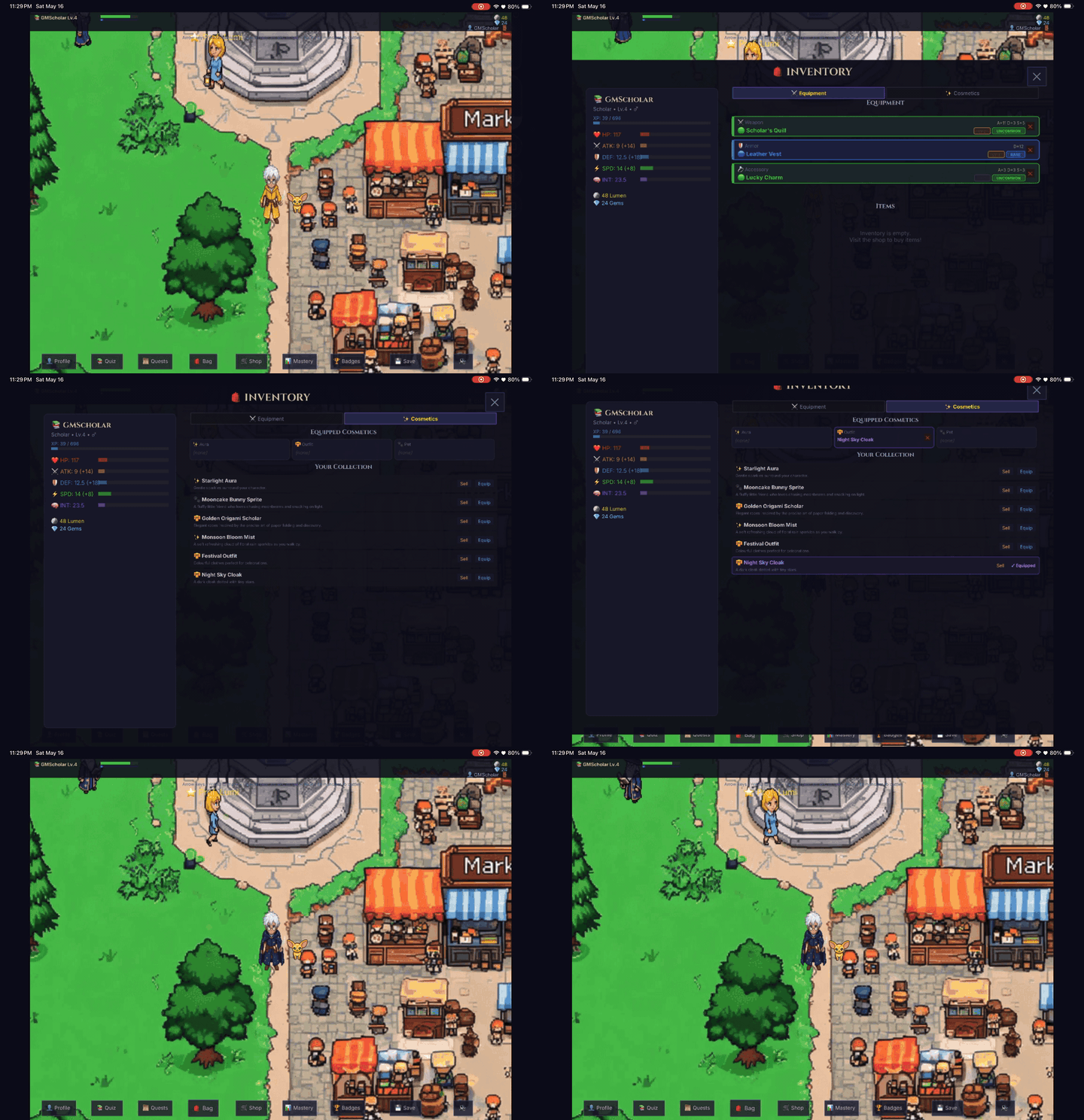
Visit the Cosmetic Shop in any major town. You can spend your earned Gems on new Outfits, Auras, and Pets. Once purchased, open your Inventory to equip them!
Heads up: The first time you equip a brand-new cosmetic, it can take a couple of minutes for the look to appear on your character in the overworld — our magical wardrobe is hand-crafting your unique outfit, pet, or aura. Feel free to keep exploring; it will pop into place once it's ready, and every time after that it will appear instantly.
My pet — how does it grow? — Pet Evolution
Every hero in When Light Fades is given a companion pet from day one. It starts life as a quiet little egg 🥚 that follows your character around the overworld. Your child's learning is what brings it to life — the pet is a living, visible record of how broadly your child engages with the curriculum.
1. How the egg hatches
The egg hatches into a Baby pet 🐣 the moment your child has been restored to their school P-level in all four subjects (English, Chinese, Math, Science). "Restored" means the Adaptive Progression system has confirmed your child has reached 80% accuracy across 50 questions in that subject — or simply answered 50 questions in total in that subject, whichever comes first. (See the Adaptive Progression entry above for full detail.) This means the hatch is structurally a celebration of breadth, not of grinding any one subject.
2. How pets gain experience — mini-games
After hatching, your pet earns experience exclusively through the educational mini-games hosted by friendly NPCs in each town. Each subject feeds one of the pet's four core attributes:
- English mini-games → ATK (attack power)
- Chinese 华文 mini-games → DEF (defence)
- Science mini-games → HP (hit points) — for P3–P6; P1–P2 have no Science yet, so their HP grows from Chinese instead
- Math mini-games → SPD (speed)
All four subjects now have mini-games — see the Mini-Games & Your Pet section above for the full line-up and where to find each host. For example, Spelling Scramble with Riddler Quill 🎲 in Verbia: tap letter cards into the blank slots to spell a word matched to your child's English level and difficulty tier, and each correct word grants +5 ATK xp for the pet (a little less if you take a hint).
Important: Mini-games do not reward Lumen. Lumen comes only from answering quiz questions during your child's learning sessions. This separation is deliberate — mini-games are a fun extra that develops the pet, never a shortcut to combat power.
3. How attribute levels are calculated
Each of the four attributes (ATK, DEF, HP, SPD) levels up on its own xp curve, matching the same formula your child's hero uses for their own levelling. The xp required to reach the next attribute level rises as the level goes up — the first level takes 100 xp, level 5 takes a cumulative 2,475 xp, level 12 takes 17,854 xp, and the level-20 ceiling takes about 58,579 xp. So early progress feels quick (most children will see their first level-up after a single Spelling Scramble session) while later levels are a longer-term goal worth celebrating.
There is no daily cap on pet xp — a keen child can play a subject's mini-game as much as they like and keep earning. Because the pet's overall level is gated by its weakest attribute (see below), the natural incentive is still to spread practice across subjects rather than grind a single one, so we don't need an artificial limit to encourage balance.
4. The pet's overall level — weakest attribute wins
Your pet's overall level is the lowest of the four attribute levels — not the highest, and not the average. A pet with ATK Lv 10, DEF Lv 3, HP Lv 7, SPD Lv 8 sits at Pet Level 3. This is the heart of the design: the pet is a public, honest signal of balanced practice. A child who only plays English mini-games will see ATK climb sky-high while the pet itself stays small — until the other three subjects catch up.
5. Evolution stages
- 🥚 Egg — the starting form. Follows the player around the overworld; not yet a battle companion.
- 🐣 Baby — hatched (all four subjects restored to P-level). The pet now fights alongside your child — it gets its own HP bar and turn gauge, picks its own target (it goes for the weakest enemy), and will throw itself in front of a blow that would otherwise knock your child out. You never have to command it.
- 🐾 Youth — Pet Level ≥ 5 in all four attributes. A new name, look and title — and steadily stronger stats.
- 🦊 Adult — Pet Level ≥ 12. A grown form, with the stats to match.
- 🌟 Elder — Pet Level ≥ 20. The final form and the proudest title. Its stats keep climbing with every level beyond this — there is no ceiling.
The pet's stats — health, attack, defence and speed — rise smoothly with every attribute level, so broad practice across all four subjects makes it hit harder and act more often in battle. It fights on its own strength; it does not alter your child's own combat stats.
6. What parents can take from this
The pet is essentially a kid-readable version of the parent dashboard. If you ever wonder "is my child playing broadly, or just hammering one subject?", glance at the pet: a tiny pet means one or more subjects haven't been touched in a while; a thriving pet means your child is genuinely engaging across the curriculum. It's the same signal as the dashboard's per-subject bars — just rendered in a way the child can see and care about.
A note on tuning: the experience curve above is our current best balance for Singapore primary-school learners, but we'll be watching how real families actually use mini-games during the coming weeks. If the curve feels too slow or too fast, we'll publish adjustments alongside any change — nothing about pet xp progression is set in stone yet.
Can I play with my friends?
Yes — in four parent-safe ways. You can challenge a confirmed friend to a live 1-v-1 mini-game battle (a head-to-head Word Search or Equation Pyramid race), rally up to four friends for a Team Challenge co-op boss raid against the Radiant Sentinel, brave the endless 🏛️ Hall of Trials boss gauntlet as a team of up to four, or host a 🌍 Play Together shared world and explore Luminara side by side (with shared battles and Party Quizzes). Full details — including how friendships are added and parent-approved — are in the Playing with Friends section above. Everything is friends-only with no open chat, and competition never affects combat power.
Can my child learn Malay instead of Chinese?
Yes — in beta. Open Menu → ⚙️ Settings → Mother Tongue and switch from 华文 Chinese to Bahasa Melayu. Mother-tongue quiz questions are then served in Malay, aligned to the same P1–P6 progression. The Malay question library is newer and still growing, which is why we label it beta — you can switch back at any time. (The Cíyǔ town mini-game remains Chinese-flavoured for now.)
What is "The Forgetting"?
It is a mysterious, creeping fog that erases memories and corrupts creatures. The only way to stop it is by proving your knowledge and generating Lumen.
In gameplay terms: if fewer than 10 quiz questions have been attempted in the last 24 hours, the fog rolls over the world and ordinary monsters grow about 20% tougher (story bosses and the weekend raid are unaffected). Showing up is what counts — every attempt clears the fog a little, right or wrong. Quiz questions and Reading Nook stories both count; mini-games don't. A short daily practice keeps the light on.